Overview
This tutorial takes you from an empty project to a benchmark result you can read, in six parts. Each part is a complete step, and the concepts are explained where they first appear. This part is the tour: what the platform contains and where each thing lives, so the four parts that follow are navigation you already recognize.
If you want the conceptual model first (what the platform is, and the five ideas the whole product rests on), read The Platform at a glance. This page is about the application in front of you.
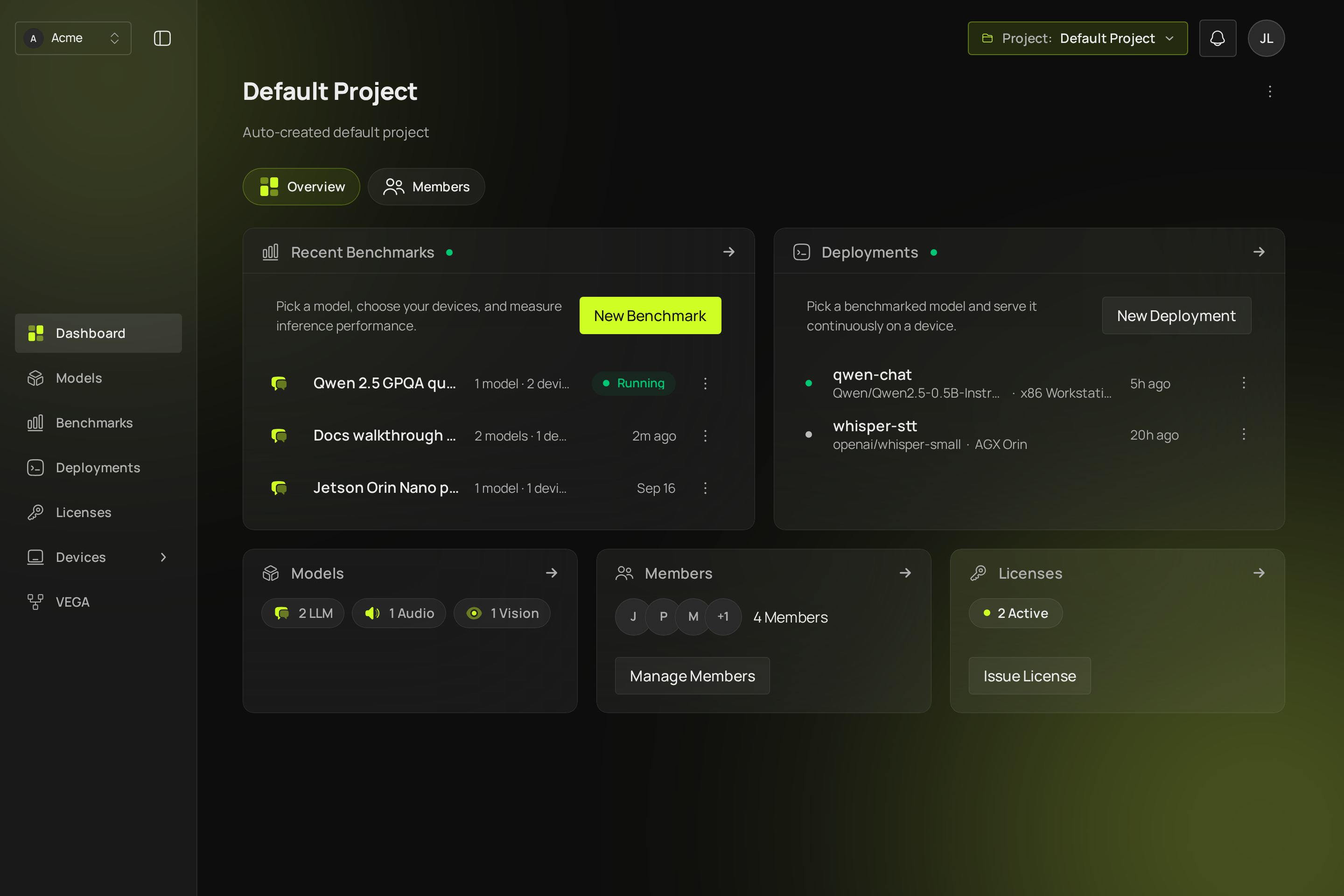
The two switchers decide everything else
The organization switcher, top left. An organization is the tenant: your company or team, the accounts in it, and the devices it owns. If you belong to more than one, this is where you change which one you are in.
The project switcher, top right. A project is one piece of work, and it holds the models, benchmark runs, deployments and licenses of that work. Every organization starts with a default project. Anything you create lands in the project shown here, so if you later cannot find a run you made, check that you are in the project you made it in.
One exception is worth learning now, because it surprises people later: devices belong to the organization, not to a project. Every project sees the same fleet, because a physical machine is shared hardware rather than the property of one piece of work.
What the navigation holds
The sidebar is the whole product. In the order you meet these things:
- Dashboard is the active project: its recent benchmark runs, its deployments, its models, its members and its licenses. It is also the fastest route to a new run.
- Models is what you can benchmark. A model here is a reference to a Hugging Face repository plus the task it performs.
- Benchmarks is your runs, newest first, each with its status. New Benchmark starts one.
- Deployments is your models running as endpoints on your own devices, which is the step after a benchmark tells you which model to ship.
- Licenses is the runtime credentials this project issues, which is what a ClikaRT runtime presents to prove it may run.
- Devices is the fleet, shared across the organization's projects. A device's page is where you read its health and reach into it. Three things live under it:
- Jobs, the individual executions behind your runs: one job per model and device pair, with its state and its log.
- Services, anything else the platform keeps running on a device, where you supply the command yourself.
- Artifacts, the file library: datasets, weights, scripts, engine bundles. Versioned, checksummed, and pushed to devices on demand.
Two ways to run on hardware you do not own sit inside those pages rather than in the sidebar: Cloud helpers, a view on the Devices page for your own cloud instances and the gateways they reach the platform through, and hosted devices, phones the platform rents by the minute, offered as a device choice when you start a benchmark.
Your account menu, top right, opens Settings: your profile, your API keys under Developer access, your organization's members under Organization, its plan and credits under Subscription, and its activity trail under Activity. A platform administrator also sees Admin, the deployment's own administration, which is not a tenant surface. The same menu holds Download ClikaRT, the runtime SDK and the license it needs (Download the ClikaRT SDK).
Members live in two places on purpose: the organization's members under Settings, then Organization, and a project's members on that project's dashboard under Members; Roles says which role is set where and what each may do. Settings, then Credentials, is where a Hugging Face token and a cloud provider credential are stored.
What this tutorial uses
Four of those: Devices to register and choose the hardware, Models to register what you are measuring, Benchmarks to run it, and the run's own page to read the result. The rest is there when you need it, and Concepts has a page on each.
What you have now
The map. The next part puts a machine of your own into the fleet.
- Full detail: Organization and project.
- Next: Add your first device.